這篇筆記將 OpenClaw 架構整理成四個層級:Core Infrastructure、Agent Runtime、Memory & State、Connectivity & Extensions。
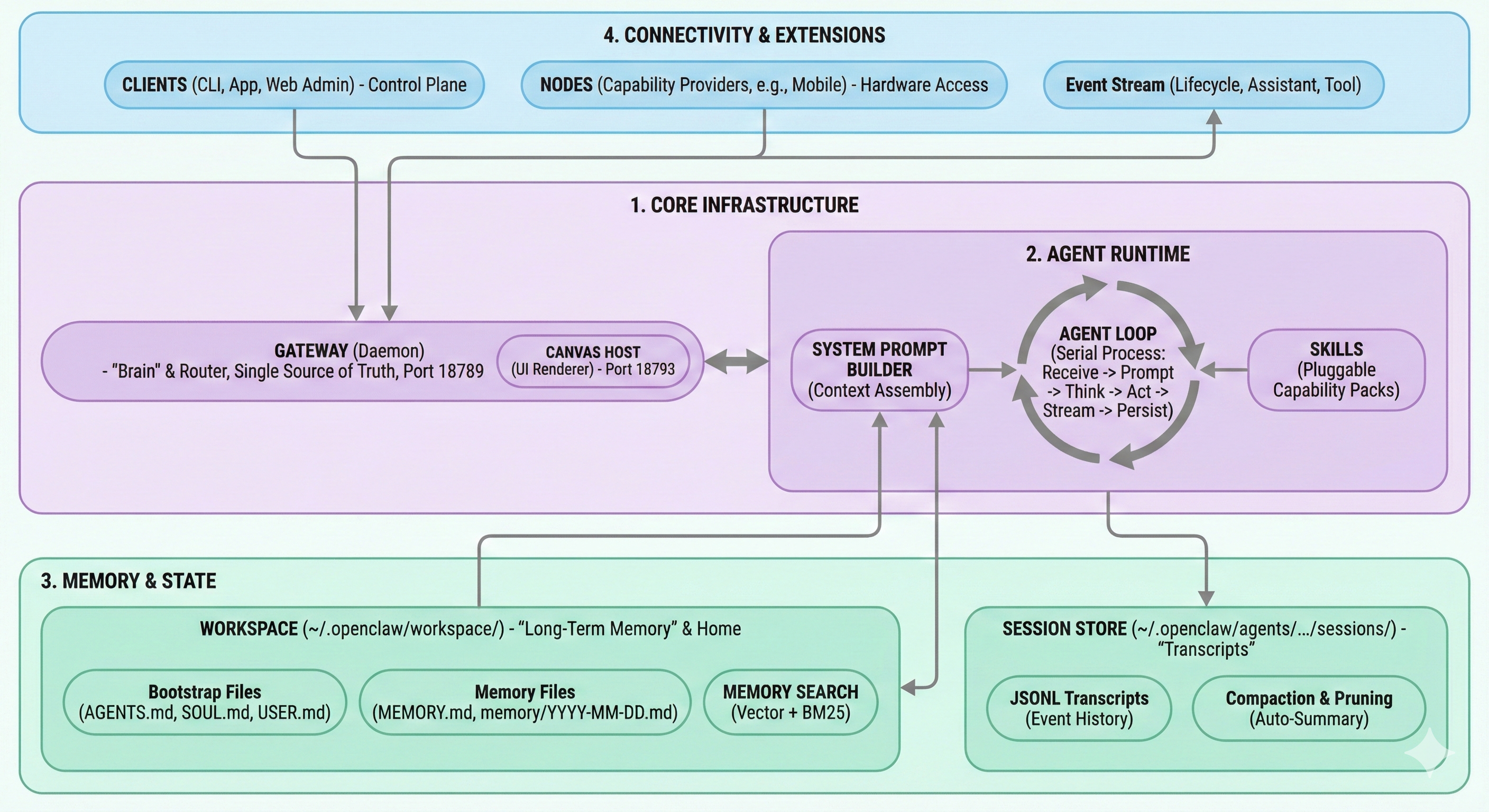
總覽
| 支柱 | 核心元件 | Debug 時的核心問題 |
|---|
| 1. Core Infrastructure | Gateway, Canvas Host | 核心 Daemon 是否正常運作且可連線? |
| 2. Agent Runtime | System Prompt Builder, Agent Loop, Skills | 執行迴圈是否從頭到尾正確完成? |
| 3. Memory & State | Workspace, Memory Search, Session Store | Context 是否正確載入/搜尋/持久化? |
| 4. Connectivity & Extensions | Clients, Nodes, Event Stream | 外部控制與整合是否正常連線? |
為什麼這個模型好用
| 分類 | 檢查重點 |
|---|
| Core Infrastructure | Gateway / Canvas Host Process 與 Port 狀態 |
| Agent Runtime | Prompt 組裝、Think/Act 循環、Tool 執行 |
| Memory & State | Bootstrap 檔案、Memory 檢索、Transcript 寫入 |
| Connectivity & Extensions | Client 存取、Node 整合、Event 流 |
flowchart LR
  A["1. Core Infrastructure"] --> B["2. Agent Runtime"] --> C["3. Memory & State"] --> D["4. Connectivity & Extensions"]

  classDef main fill:#1f2329,stroke:#d1d5db,stroke-width:1.5px,color:#f9fafb,font-size:16px;
  class A,B,C,D main;
1. Core Infrastructure
元件
- Gateway (Daemon)
- 系統的「大腦」兼路由器
- 單一真實來源 (Single Source of Truth)
- WebSocket 監聽
:18789
- Canvas Host (UI Renderer)
故障訊號
- 完全沒回應:Gateway 掛了或無法連線
- 文字正常但 UI 不見:Canvas Host 無法使用
- 頻道隨機斷線:Gateway 層的 Adapter / Session 問題
2. Agent Runtime
Runtime 執行鏈
- Receive
- Prompt
- Think
- Act
- Stream
- Persist
- System Prompt Builder(Context 組裝)
- Agent Loop(序列化處理流程)
- Skills(可插拔的能力模組)
實際檢查項目
- Prompt Builder 是否包含 Rules + Tool Schemas + Runtime Context
- Skills 是否如預期載入本次執行
- Tool Calls 是否在 Persist 步驟前完成
- 序列化寫入是否防止了 Session 更新衝突
flowchart LR
  A[Receive] --> B[Prompt]
  B --> C[Think]
  C --> D[Act]
  D --> E[Stream]
  E --> F[Persist]
3. Memory & State
Workspace (~/.openclaw/workspace/)
- Bootstrap 檔案
AGENTS.mdSOUL.mdUSER.md
- Memory 檔案
MEMORY.mdmemory/YYYY-MM-DD.md
- Memory Search
Session Store (~/.openclaw/agents/.../sessions/)
- JSONL Transcript(事件歷史)
- Compaction & Pruning(自動摘要)
- 與長期 Workspace Memory 分離
| 儲存區域 | 用途 |
|---|
| Workspace | 持久身份 + 長期 Memory |
| Session Store | Session Transcript 與事件歷史 |
4. Connectivity & Extensions
外部控制平面
- Clients:CLI、App、Web Admin
- Nodes:能力提供者(例如行動裝置 / 硬體存取)
- Event Stream:Lifecycle、Assistant、Tool 事件
排障順序
- 確認 Gateway Process 與監聽 Port
- 確認 Client / Node 的驗證與 Session 狀態
- 確認 Event Stream 流程
- 確認 Tool Endpoint / 網路可達性
故障模式速查表
| 症狀 | 最可能的層級 |
|---|
| 完全沒回應 | Core Infrastructure / Connectivity |
| 有文字回應但沒有 UI | Core Infrastructure (Canvas Host) |
| 人格或 Context 錯誤 | Agent Runtime / Memory & State |
| Memory 沒有保留 | Memory & State |
| Tool 間歇性失敗 | Connectivity & Extensions |
對應本 Repo 的檔案
content/openclaw/index.md:主題索引content/setup-env/utm-set-ubuntu.md:部署與排障指南content/openclaw/openclaw-architecture-four-pillars.md:本架構總覽