Purpose: quick reference for how OpenClaw runs multiple agents on one Gateway, routes messages deterministically, and reports presence.
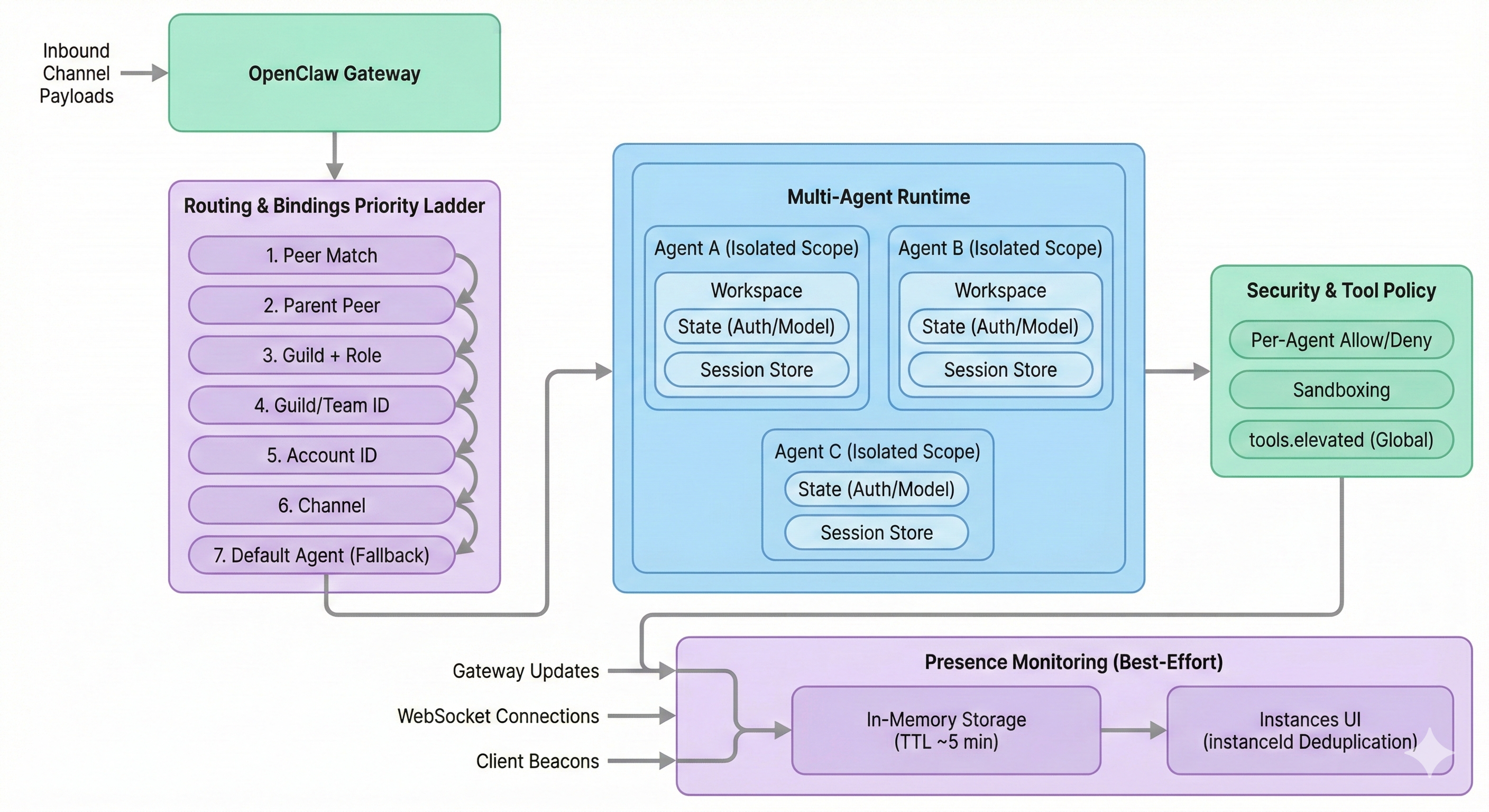
Overview: this diagram shows one OpenClaw Gateway receiving inbound channel payloads, applying a deterministic Routing & Bindings priority ladder (Peer → Parent Peer → Guild+Role → Guild/Team → Account → Channel → Fallback), and selecting an agentId. The selected agent runs in an isolated scope (workspace, state directory with auth/model registries, and session store), then executes tools under a security check with per-agent allow/deny policy (while tools.elevated remains global). The lower lane shows Presence as best-effort in-memory monitoring fed by gateway/WebSocket/beacon updates, pruned after TTL (~5 minutes), and displayed in the macOS Instances UI with instanceId-based deduplication.
One-Screen Summary
| Topic | Key Point |
|---|---|
| One agent means | Fully scoped environment, not just a prompt |
| Multi-agent runtime | One Gateway can host multiple isolated agents side-by-side |
| Routing | Binding rules are deterministic; most specific rule wins |
| Security | Workspace is default cwd; strict isolation needs sandboxing/docker/tool policy |
| Presence | Best-effort, in-memory view with TTL pruning |
1. What “One Agent” Actually Is
In OpenClaw, each agent has isolated state surfaces.
| Surface | Per-Agent Isolation |
|---|---|
| Workspace | Own AGENTS.md, SOUL.md, notes |
State directory (agentDir) | Own auth profiles and model registry |
| Session store | Own chat/session history by agentId |
Critical auth reminder:
- Auth profiles are per-agent.
- A new agent does not inherit credentials from
mainunless you explicitly copyauth-profiles.json.
2. Routing: How Messages Find the Target Agent
Routing is deterministic. The first most-specific matching binding wins.
| Priority | Binding Type |
|---|---|
| 1 (highest) | Peer match (specific user/DM ID) |
| 2 | Parent peer (thread inheritance) |
| 3 | Guild + role |
| 4 | Guild/team ID |
| 5 | Account ID |
| 6 | Channel |
| 7 (fallback) | Default agent (usually main) |
Practical reading rule:
- If routing is surprising, check for a more-specific peer rule overriding channel/global rules.
2.1 Telegram Routing: Minimal Decision Model
For Telegram, routing is easiest to understand as Who → Context → Identity → Fallback.
| Key | Question | Gateway Input | Typical Rule | Why It Is Sufficient |
|---|---|---|---|---|
| Peer ID (Who) | “Is this a specific person/chat with dedicated routing?” | Sender/chat peer metadata | match.peer | Handles VIP/specific-user routing with highest precision |
| Parent ID (Context) | “Is this a reply that should stay in the same thread/agent?” | reply_to_message_id + owner lookup | parent-peer inheritance | Keeps replies on the agent that owns the original message |
| Account ID (Identity) | “Which bot login/token received this?” | Account metadata derived from token mapping | match.accountId | Separates work/personal (or brand A/B) identities cleanly |
| Default (Safety net) | “No specific rule matched?” | No match state | default agent | Guarantees deterministic routing for unknown traffic |
Practical Telegram scope:
- Guild/team layers are usually not used for Telegram payloads.
- Channel rule (
telegram) can exist, but many setups can route fully with peer + parent + account + default.
Telegram ladder (packet view)
| Priority | Rule | Input (What Gateway Sees) | Output (Decision) |
|---|---|---|---|
| 1 | Peer Match | senderId/chatId matches match.peer | Route to specific agent; stop |
| 2 | Parent Peer | Reply metadata resolves original message owner | Route to owning agent; stop |
| 3-4 | Guild/Team | Usually absent on Telegram | Skip/continue |
| 5 | Account ID | Incoming token maps to configured account id | Route to account-bound agent; stop |
| 6 | Channel (optional) | channel=telegram | Route to channel-default agent; stop |
| 7 | Default | No prior match | Route to default agent |
Key technical details:
- Peer input: DM commonly maps to user ID; group messages commonly map to group/chat context.
- Parent dependency: requires message-owner linkage in Gateway state; if linkage is gone, inheritance may fail.
- Account input:
accountIdis user-defined inopenclaw.json(telegram.accounts[].id) and is derived by mapping the receiving token to that configured id. - Stop logic: first match wins; lower levels are not evaluated after match.
3. Common Setup Patterns
A) Multi-Account (“Business Phone”)
| Scenario | Config Pattern | Result |
|---|---|---|
| Two WhatsApp numbers on one server | Route by accountId | Number A → Agent A, Number B → Agent B, fully separate |
B) Deep Work Split (One User, Two Brains)
| Scenario | Config Pattern | Result |
|---|---|---|
| Daily chat on fast model, one DM thread on premium model | Global channel binding + specific peer binding | Target DM uses specialized agent/model; direct-chat identity remains consistent |
C) Family Shared Gateway
| Scenario | Config Pattern | Result |
|---|---|---|
| Multiple people share one host | Different agentId per person | Separate auth, sessions, and memory; no cross-talk by default |
4. Security and Sandboxing
Use this as the practical boundary checklist.
| Control | What It Does | Note |
|---|---|---|
| Workspace default behavior | Sets working directory expectations | Not a hard sandbox by itself |
agents.defaults.sandbox | Enables stronger path/process isolation | Needed to block absolute-path escapes |
| Per-agent Docker (v2026.1.6+) | Isolates tool execution environment | Useful for untrusted workloads |
| Per-agent tool allow/deny | Restricts tool surface by agent | tools.elevated remains global |
5. Presence (Monitoring)
Presence is observability, not guaranteed ground truth.
| Aspect | Behavior |
|---|---|
| Purpose | Best-effort list of connected instances (for example macOS Instances tab) |
| Sources | Gateway events, WebSocket connections, client beacons |
| Storage | In-memory and ephemeral |
| TTL | Entries pruned when older than ~5 minutes |
| Dedup | Uses instanceId; unstable IDs can create duplicate rows |
Operational implication:
- Presence rows can be temporarily stale or duplicated after reconnects.
Quick Troubleshooting Checklist
- Confirm expected
agentIdowns the workspace/auth/session surfaces - Inspect bindings from highest to lowest priority (peer before channel)
- Verify
accountId/guild/team/channel identifiers match real inbound metadata - If isolation is required, enable sandboxing and/or per-agent Docker
- If presence looks wrong, check
instanceIdstability and TTL timing
Fast Mental Model
- Agent = isolated identity + memory + credentials + sessions
- Binding = deterministic router to pick that agent
- Presence = soft health signal, not authoritative truth