This chapter explains Context in OpenClaw: what is sent to the model during a run, what consumes the context window, and how to inspect/control it.
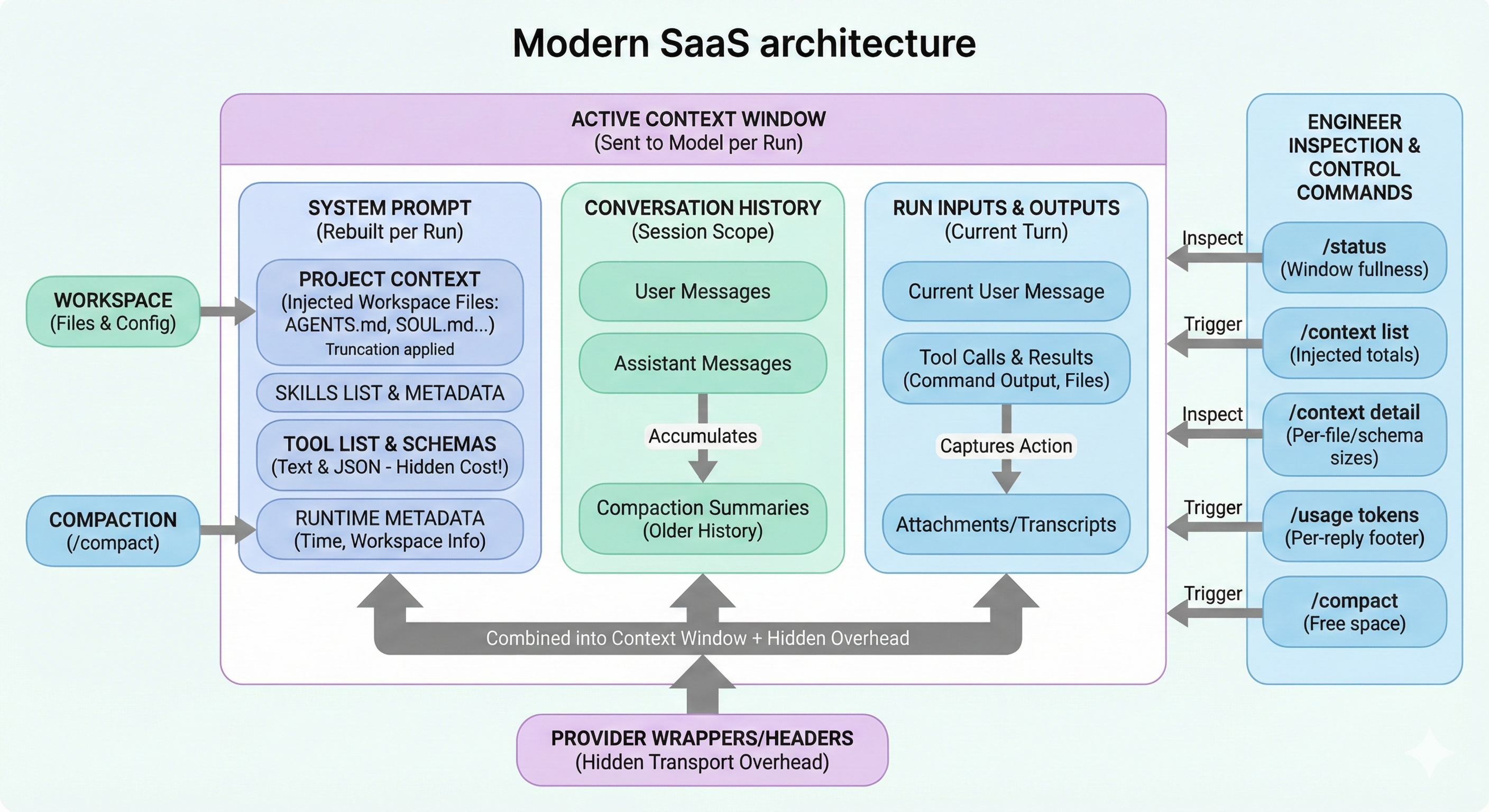
Overview: this diagram frames context as one Active Context Window (sent per run) composed of three visible blocks: System Prompt (including Project Context, skills metadata, tool list/schemas, runtime metadata), Conversation History (user/assistant messages plus compaction summaries), and Run Inputs & Outputs (current message, tool calls/results, attachments/transcripts). It also highlights hidden budget pressure from Provider Wrappers/Headers and shows the operator control loop: inspect with /status and /context detail, then adjust using /context list, /usage tokens, and /compact.
Analysis
Use this as the mental model before touching tuning knobs.
| Concept | Why It Matters |
|---|---|
| Context | The model can only reason over what fits in the current context window |
| Memory | Can live on disk and be reloaded later; it is not always in the active window |
| Main risk | Token budget is dominated by hidden contributors (tool schemas, wrappers, attachments) |
| Main control surface | /status, /context list, /context detail, /usage tokens, /compact |
Core distinction:
- Context = run-time window (now)
- Memory = persisted knowledge (later)
Plan
This chapter is structured in the same order you debug context issues in production.
- Define what counts toward the window
- Show quick inspection commands
- Explain prompt assembly and file injection limits
- Break down skills/tools overhead
- Explain directives/commands behavior
- Clarify persistence (sessions, compaction, pruning)
- Give an operator checklist
Quick Start (Inspect Context)
Run these commands in order when replies become weak/truncated or tool calls behave strangely.
| Command | What You Learn |
|---|---|
/status | High-level window fullness + session settings |
/context list | Injected files and rough size totals |
/context detail | Per-file/per-skill/per-tool schema contributors |
/usage tokens | Per-reply token usage footer |
/compact | Summarize older history to free active window |
What Counts Toward the Context Window
Everything the model receives counts, including parts you may not see directly.
| Contributor | Counts? | Notes |
|---|---|---|
| System prompt | Yes | Includes rules, tools, skills list, runtime metadata, injected files |
| Conversation history | Yes | User + assistant messages in session scope |
| Tool calls and results | Yes | Often large when command output/files are verbose |
| Attachments/transcripts | Yes | Images/audio/files and derived text |
| Compaction artifacts | Yes | Summaries and pruning metadata still consume budget |
| Provider wrappers/headers | Yes | Hidden transport/provider overhead |
How OpenClaw Builds the System Prompt
The system prompt is rebuilt each run and owned by OpenClaw.
| System Prompt Part | Typical Content |
|---|---|
| Tooling | Tool list + short descriptions |
| Skills list | Skill metadata (name/description/location) |
| Workspace info | Workspace location and runtime metadata |
| Time | UTC and user-local converted time (if configured) |
| Project Context | Injected bootstrap files from workspace |
Practical implication:
- A “small” chat can still overflow if tooling/schema/context injection is heavy.
Injected Workspace Files (Project Context)
By default, OpenClaw injects a fixed bootstrap set when present.
| File | Purpose |
|---|---|
AGENTS.md | Behavior and operating rules |
SOUL.md | Persona/tone profile |
TOOLS.md | Tool behavior notes/policies |
IDENTITY.md | Agent identity and stance |
USER.md | User profile/context |
HEARTBEAT.md | Optional heartbeat state |
BOOTSTRAP.md | First-run bootstrap material |
Limits:
- Per-file injection cap:
agents.defaults.bootstrapMaxChars(default20000chars) - Total bootstrap cap:
agents.defaults.bootstrapTotalMaxChars(default24000chars)
/context shows raw vs injected sizes and whether truncation happened.
Skills and Tools: The Two Biggest Hidden Costs
Use this table to understand why context can fill quickly even with short chat messages.
| Source | How It Adds Cost |
|---|---|
| Skills | Skills list text is injected into system prompt; full skill instructions are loaded on-demand |
| Tools (text) | Tool list/description section in prompt |
| Tools (schemas JSON) | Large schema payload sent for tool-calling; counts even if not shown as plain text |
Practical check:
- Use
/context detailto identify top skill entries and largest tool schemas.
Commands, Directives, and Inline Shortcuts
Not every /... token reaches the model in the same way.
| Type | Behavior |
|---|---|
| Standalone command | Message containing only /... executes as gateway command |
Directive (/think, /verbose, /reasoning, /elevated, /model, /queue) | Stripped before model input; can persist settings or act as per-message hint |
| Inline shortcut | Allowlisted senders can trigger certain /... tokens inside normal text; shortcut stripped before model sees remaining content |
Sessions, Compaction, and Pruning
This is where many readers confuse persistence behavior.
| Mechanism | What Persists | What Changes |
|---|---|---|
| Normal history | Transcript entries | Grows until compacted/pruned by policy |
| Compaction | Summary persisted into transcript | Older detail compressed; recent turns kept |
| Pruning | Transcript unchanged | Removes old tool results from in-memory prompt for a run |
What /context Actually Reports
/context prefers real run-built data when available.
| Mode | Meaning |
|---|---|
| System prompt (run) | Captured from last embedded tool-capable run and stored in session data |
| System prompt (estimate) | Computed on-demand when no run report exists |
Important:
/contextreports sizes and top contributors.- It does not dump full system prompt text or full tool schemas.
Example (Interpreting Output)
Use this pattern to read output quickly:
- Check system prompt size first
- Check truncation flags in injected files (
OKvsTRUNCATED) - Check top tool schemas in
/context detail - Compare cached session tokens against model context limit
Operator Troubleshooting Checklist
- Run
/statusand confirm context pressure - Run
/context detailand find top contributors (files/tools/skills) - Trim oversized bootstrap files, especially
TOOLS.md - Run
/compactwhen history dominates the budget - Re-run and verify token usage with
/usage tokens
Related Docs
- Slash commands
- Token use and costs
- Compaction
- Session pruning
- System prompt